
Executive summary

Figure 1. A controlled approach to enterprise AI automation.
Artificial intelligence is moving beyond experimental chatbots into everyday business operations. Organizations can now combine machine learning, document understanding, language models, APIs, and deterministic workflow rules to reduce repetitive effort.
Yet the business case is not simply about replacing tasks with software. Sustainable cost reduction comes from fewer errors, faster cycle times, reduced rework, better capacity planning, and stronger employee productivity.
The most effective projects begin with a measurable operational bottleneck. A company processing thousands of invoices may need document extraction and approval routing, while a service organization may benefit more from ticket classification and knowledge retrieval.
The right AI automation use case depends on transaction volume, data quality, exception frequency, integration complexity, and the risk of incorrect actions.
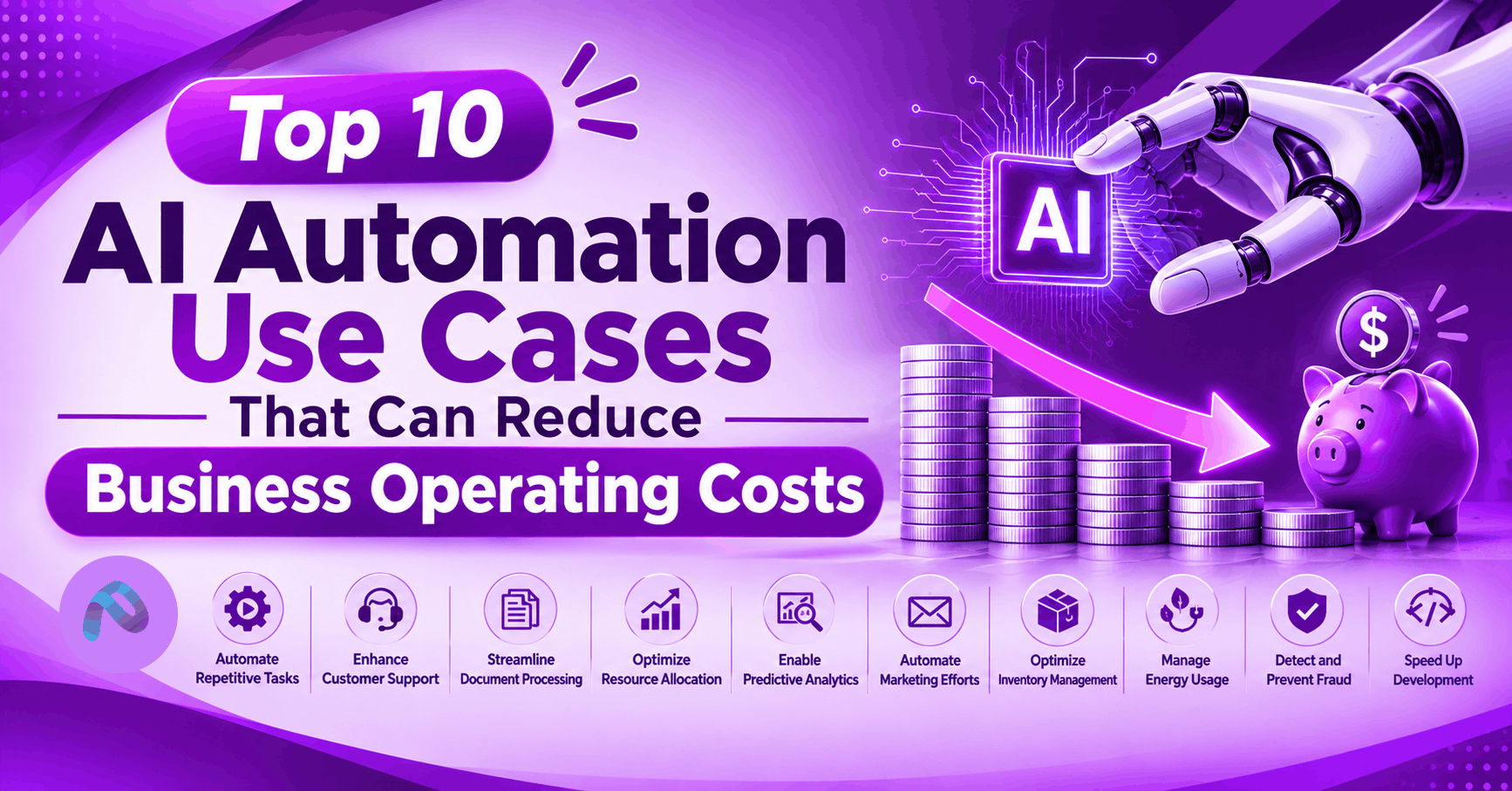
This guide examines ten practical AI automation opportunities, how each works, what to measure, and how to build a credible return-on-investment case. The illustrations and financial figures are examples for planning, not claims of typical industry savings.
What Is AI Automation, and How Does It Reduce Costs?
AI automation combines artificial intelligence with business process automation to interpret information, make bounded recommendations, and coordinate actions. Traditional automation is excellent for predictable rules. AI can add value when the inputs are less structured: emails, PDFs, service tickets, images, conversations, or fluctuating demand. A mature implementation uses both approaches, not AI for every decision.
Cost reduction can appear in several forms: fewer minutes per transaction, lower error and rework rates, reduced overtime, fewer avoidable outages, less working capital tied up in inventory, and more work completed without proportional hiring. Crucially, hours released are not automatically cash savings. Finance teams should distinguish realized budget reductions from capacity redeployed to other priorities.
Top 10 AI Automation Use Cases
1. Customer Support Automation
AI can classify incoming requests, suggest grounded answers, retrieve order information, summarize conversations, and route exceptions to human agents. An approved agentic workflow may also perform narrow actions such as updating ticket status.
KPIs to track: Support volume, average handling time, first-contact resolution, customer satisfaction, escalation rate.
Practical starting point: Start with a read-only knowledge assistant and human-reviewed replies. Evaluate accuracy across common and unusual requests; avoid allowing refunds or account changes without appropriate authorization.
2. Invoice and Accounts Payable Automation
Intelligent document processing can capture invoice fields, match purchase orders, flag duplicates, and route exceptions. Rules handle exact matching while AI interprets inconsistent supplier formats.
KPIs to track: Cost per invoice, straight-through processing rate, exception rate, late-payment fees, duplicate payments.
Practical starting point: Pilot with a representative sample of suppliers and document formats. Keep payment execution behind finance approval and maintain an audit trail.
3. Intelligent Document Processing
Insurance forms, contracts, shipping records, applications, and compliance packets often require employees to copy information between systems. AI extraction and classification can reduce manual entry and accelerate review.KPIs to track: Minutes per document, extraction accuracy, correction rate, throughput, turnaround time.
Practical starting point: Benchmark against manually labeled documents. Track confidence thresholds and send ambiguous or sensitive records for review.
4. IT Help Desk and Incident Automation
AI can categorize tickets, correlate alerts, recommend runbook steps, retrieve configuration knowledge, and prepare incident summaries. Controlled automation can restart a noncritical service after health checks and approval.
KPIs to track: Mean time to resolution, tickets per technician, repeat incidents, false alerts, service availability.
Practical starting point: Integrate with ITSM tools and observability systems. Start with recommendations; restrict production changes and record every automated action.
5. Sales and CRM Workflow Automation
AI can enrich leads from approved sources, summarize calls, draft follow-ups, flag stale opportunities, and recommend next-best actions. Workflow automation keeps CRM records consistent and reduces administrative burden.
KPIs to track: CRM completeness, time spent on updates, lead response time, conversion rate, sales-cycle length.
Practical starting point: Use consent-aware data handling and approved messaging. Human review helps avoid inaccurate personalization or unwanted outreach.
6. HR and Employee Onboarding Automation
HR teams can automate document collection, policy Q&A, checklist tracking, onboarding communications, and access requests. AI can assist with drafting and routing, while deterministic systems enforce policy.
KPIs to track: Onboarding cycle time, HR hours per hire, missing documents, employee satisfaction.
Practical starting point: Avoid autonomous employment decisions. Protect sensitive employee information and require explicit approvals for account provisioning.
7. Predictive Maintenance
Machine learning can analyze sensor signals, operating hours, and maintenance history to identify equipment at risk of failure. Teams can schedule inspections before costly unplanned downtime occurs.
KPIs to track: Unplanned downtime hours, maintenance cost per asset, false alarms, mean time between failures.
Practical starting point: Validate model predictions against historical failures. Maintenance recommendations should be reviewed by qualified engineers and safety teams.
8. Inventory and Demand Forecasting
AI forecasting can incorporate sales history, seasonality, promotions, and external demand signals to support replenishment decisions. Better forecasts can reduce overstock and stockouts.
KPIs to track: Forecast error, inventory turns, stockout frequency, carrying costs, write-offs.
Practical starting point: Compare predictions against a simple baseline and test by product category. Avoid full automation when demand patterns shift unexpectedly.
9. Cybersecurity Monitoring and Response
AI-assisted detection can group related alerts, enrich incidents with context, summarize investigation evidence, and recommend containment steps. This may reduce analyst triage effort and improve response consistency.
KPIs to track: Alert triage time, false-positive rate, mean time to detect, mean time to respond.
Practical starting point: Keep high-impact containment actions under policy-based controls and human approval. Evaluate adversarial manipulation and protect security telemetry.
10. Supply Chain and Procurement Automationp
AI can classify purchase requests, compare approved supplier offers, identify contract exceptions, summarize supplier communications, and flag delivery risks. Integrated workflows can accelerate purchasing without bypassing controls.
KPIs to track: Purchase-order cycle time, procurement processing cost, supplier exceptions, on-time delivery.
Practical starting point: Use approved supplier data, transparent comparison criteria, and documented approval thresholds for purchases and contract changes.
Comparing AI Automation Opportunities
No single use case is the best investment for every business. The following chart is an illustrative prioritization exercise: it shows where a hypothetical organization might find opportunities based on volume and process maturity. Scores are not market benchmarks or guaranteed savings.
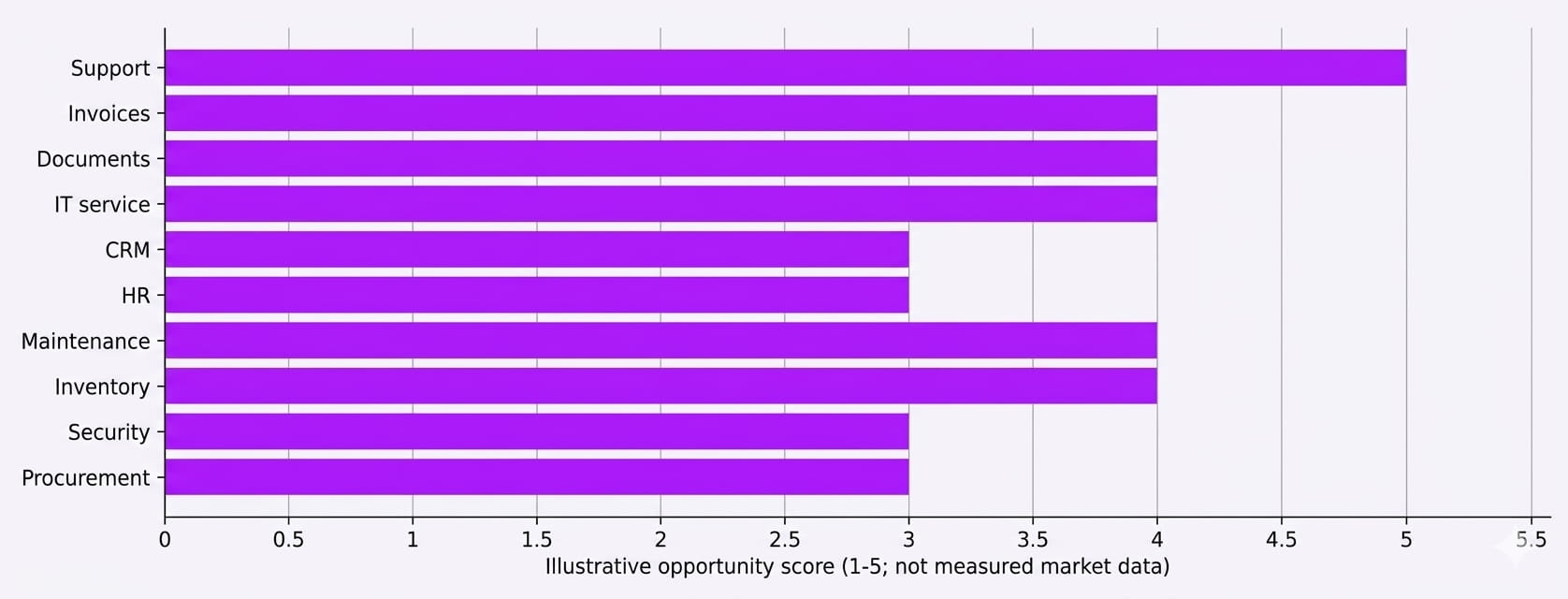
Figure 2. Illustrative opportunity scores for ten use cases (1–5 scale).
| Use case | Primary benefit | Main implementation dependency |
| Support | Handling efficiency | Accurate knowledge and CRM access |
| Accounts payable | Lower processing effort | ERP integration and controls |
| Document processing | Faster extraction | Representative labeled documents |
| IT service | Faster resolution | Runbooks and observability |
| Sales / CRM | Less admin effort | Data quality and consent |
| HR | Faster onboarding | Identity and policy controls |
| Maintenance | Less downtime | Reliable sensor history |
| Inventory | Lower carrying cost | Demand and stock data |
| Cybersecurity | Faster triage | Alert quality and permissions |
| Procurement | Faster purchasing | Supplier and contract data |
How to Calculate AI Automation ROI
A credible business case starts with baseline metrics: monthly transaction volume, current handling time, fully loaded labor cost, error frequency, and the cost of rework. Next, estimate the proportion of work that can be automated safely and subtract the time still required for review, exceptions, and oversight. Finally, include the full cost of software, implementation, infrastructure, integration, security, training, and maintenance.
Illustrative scenario: A business performs 1,000 manual handling hours per month. A tested workflow reduces this to 650 hours, freeing 350 hours of capacity. At an assumed $35 loaded hourly cost, that represents $12,250 per month in theoretical capacity value. Whether it becomes cash savings depends on overtime reduction, avoided hiring, or other measurable financial outcomes.
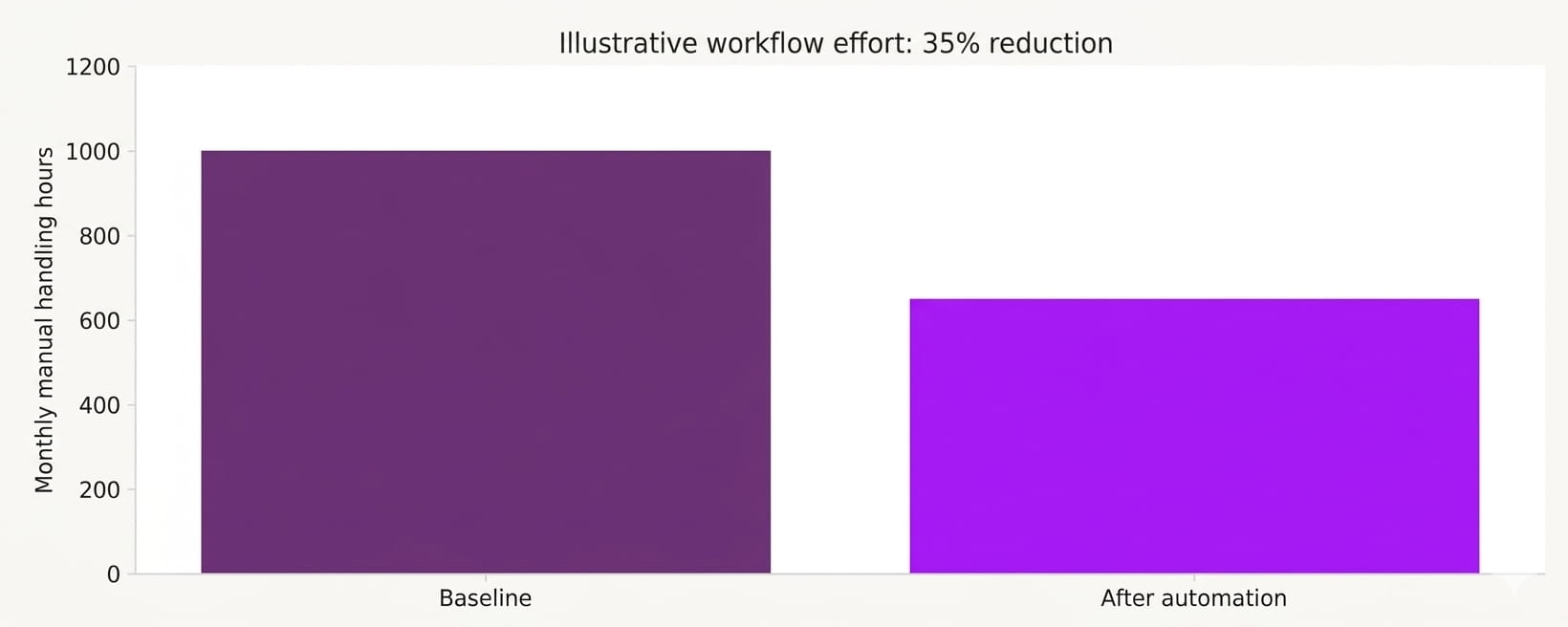
Figure 3. Hypothetical before-and-after manual effort; not an industry average.
Consider a second simplified investment model: an initial $50,000 setup cost, $40,000 annual operating costs, and $90,000 annual realized benefits. At the end of year one, cumulative benefits equal cumulative costs ($90,000). By year three, benefits total $270,000 and costs total $170,000, yielding $100,000 cumulative net benefit. These numbers exclude discounting, tax effects, and implementation delays.
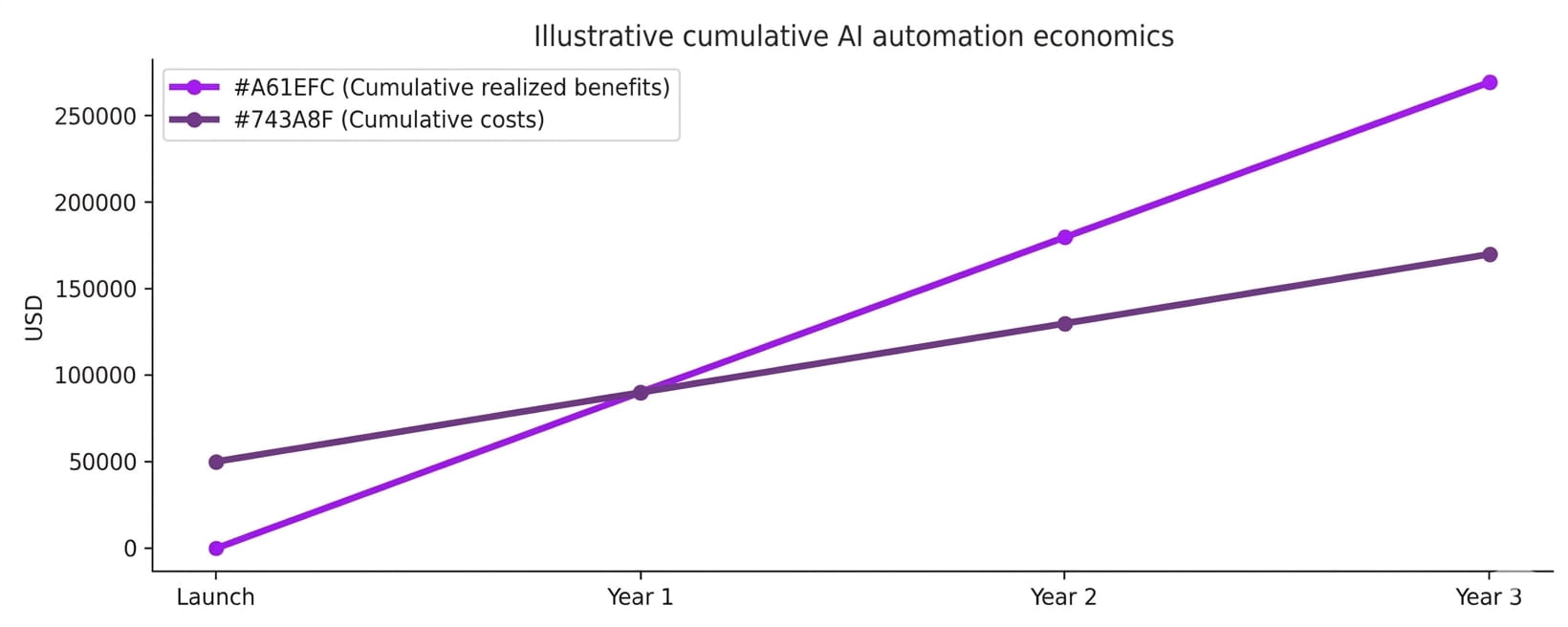
Figure 4. Illustrative three-year cumulative benefits and costs, in USD.
ROI (%) = (realized financial benefits - total costs) / total costs × 100. For the three-year example, simple ROI is approximately 58.8%. Use risk-adjusted scenarios and net present value for formal investment approval rather than relying on a single optimistic estimate.
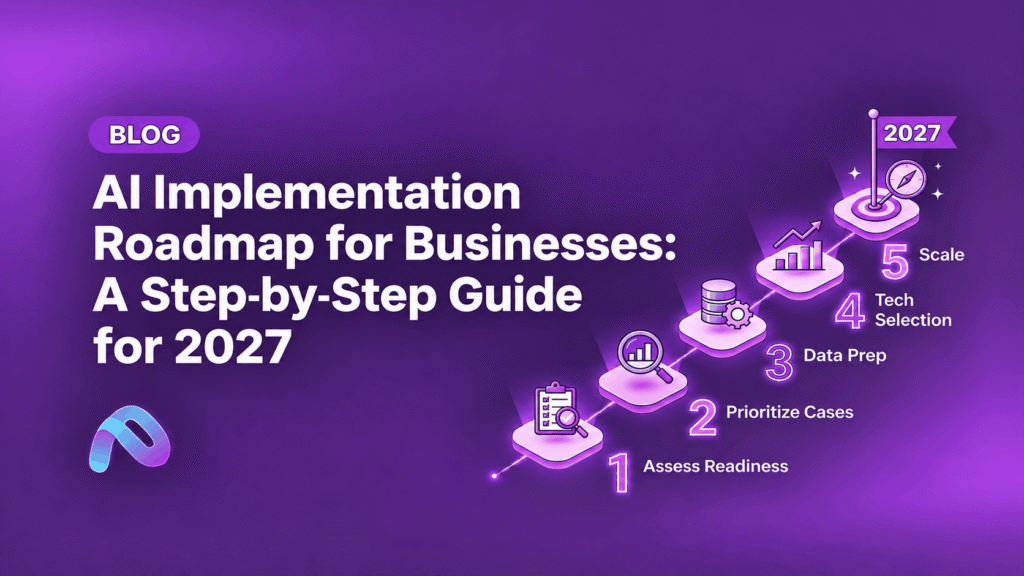
A Five-Step Implementation Roadmap
1. Identify a measurable process
Select high-volume, repetitive workflows with clear owners, reliable data, and limited risk. Document the baseline before changing anything.
2. Validate data and controls
Map systems, permissions, retention requirements, exception paths, and human approvals. Remove unnecessary access and confirm data quality.
3. Build a narrowly scoped pilot
Use representative cases, including difficult exceptions. Measure accuracy, cycle time, cost, and employee feedback against the current process.
4. Integrate and train
Connect approved systems, test failure recovery, assign support ownership, and train staff on when to trust or escalate AI outputs.
5. Monitor and scale selectively
Track drift, costs, security events, operational KPIs, and realized financial outcomes. Expand only after a pilot demonstrates reliable value.
Common Risks and Hidden Costs
AI automation can fail when teams overlook integration maintenance, data preparation, model inference charges, evaluation work, exception handling, monitoring, or employee training. A workflow that performs well on clean test data may struggle with real customer emails or unusual invoices. Organizations also need to account for vendor outages, model changes, privacy requirements, and unauthorized tool actions.
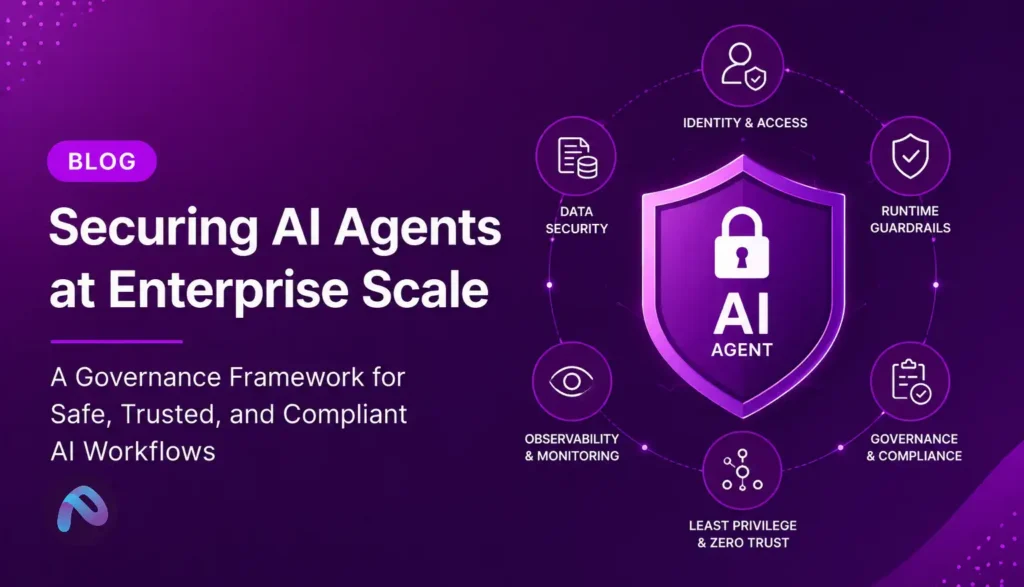
For sensitive or high-impact processes, use least-privilege access, approval gates, logs, retry limits, rollback procedures, and periodic quality evaluations. The NIST AI Risk Management Framework is a useful governance reference, while the OWASP guidance for LLM applications addresses security threats such as prompt injection and insecure output handling.
Frequently Asked Questions
Which AI automation use case should a small business start with?
Start with a frequent, low-risk workflow such as document classification, knowledge retrieval, or appointment-related administration. Select based on measurable volume and integration simplicity.
Can AI automation reduce operating costs immediately?
Some pilots show early productivity improvements, but realized financial savings may take longer. Implementation and change-management costs should be included.
What is the difference between RPA and AI automation?
Robotic process automation follows predefined rules. AI automation can interpret less structured information and support decisions, often working alongside RPA.
How much does enterprise AI automation cost?
Cost depends on complexity, transaction volume, integrations, security, and maintenance. Request a scoped estimate rather than relying on generic market price claims.
How do you measure success?
Track a before-and-after baseline, error rates, cycle time, adoption, exception handling, realized savings, and total ownership costs.
Should AI agents be allowed to make payments or security changes?
High-impact actions require strong authorization, auditability, and typically human approval. Autonomous permissions should be limited to clearly tested and governed workflows.
Conclusion: Focus on Measurable Automation Value
The best AI automation projects are not necessarily the most advanced. They are the ones that remove costly friction from real business workflows while preserving quality, accountability, and trust. Customer support, finance, document processing, IT operations, sales, HR, maintenance, inventory, cybersecurity, and procurement all offer opportunities—but each requires its own evidence-based business case.